
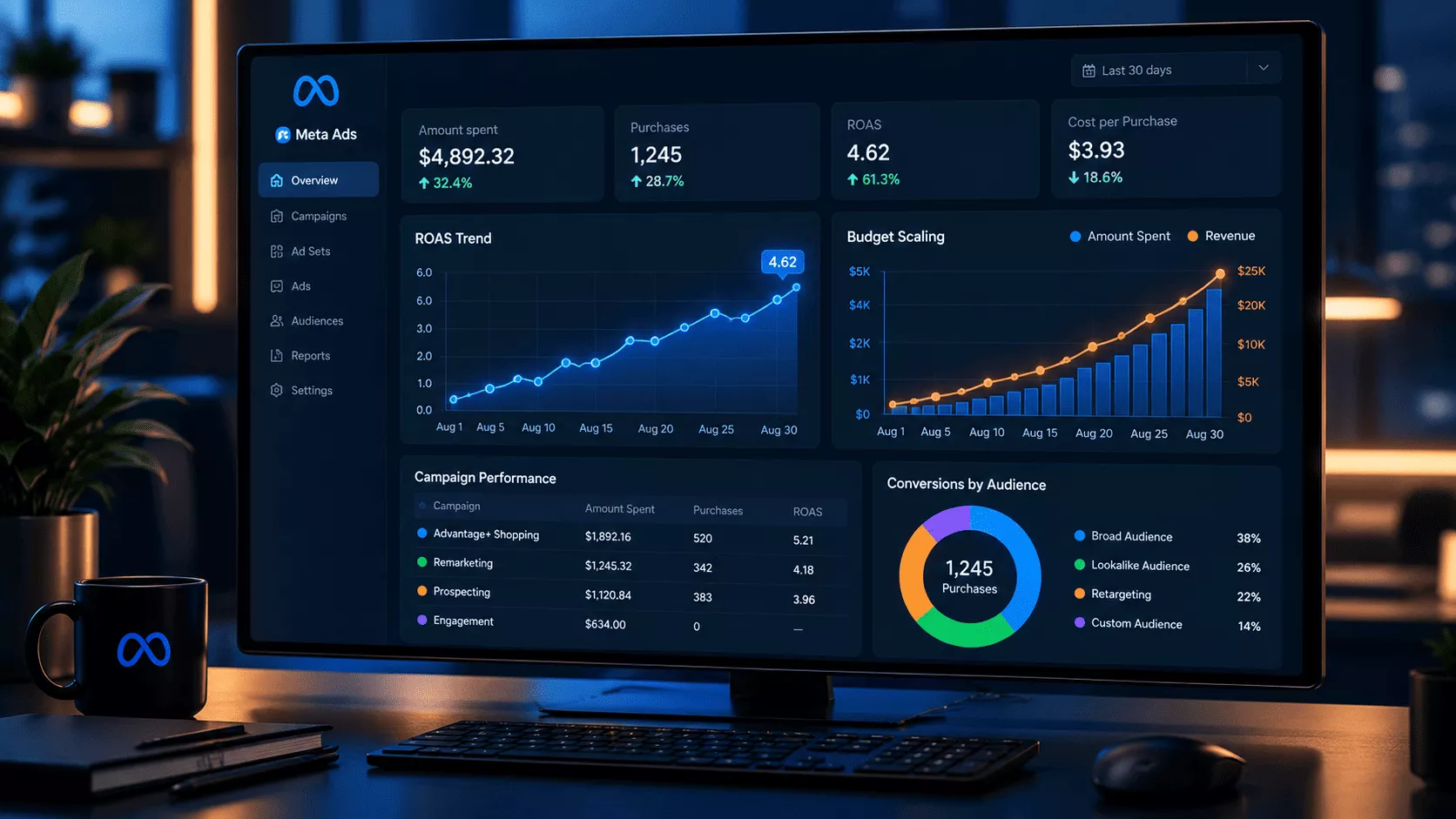
You’ve found something that works. Your Meta Ads campaign is converting, ROAS looks healthy, and the obvious next move is to spend more. So you double the budget and within days the numbers fall apart.
CPA climbs. ROAS drops. The campaign that was working fine at $200 a day looks completely different at $500. Nothing changed except the budget, and somehow that was enough to break everything.
What you’re seeing isn’t a fluke Meta’s algorithm isn’t broken, it’s just doing what it was built to do at a scale it wasn’t ready for yet. Once you know what’s actually driving it, the guesswork goes away.
What follows is a practical breakdown budget pacing, campaign structure, audience strategy, creative rotation, and how to catch the warning signs before they turn into expensive mistakes.
If you’d rather have an experienced team manage this for you, OLBUZ’s Meta Ads Management service handles everything from campaign structure to scaling strategy.
Why Meta Ads ROAS Drops When You Scale
Most advertisers go straight to fixing symptoms swapping audiences, changing creatives, adjusting bids without understanding what actually caused the drop. Here’s what’s really happening.
At lower budgets, Meta works within a tight pool. It finds your most likely buyers, serves them your ads, and learns from whoever converts. The system is efficient precisely because it’s constrained it can’t spend broadly, so it spends carefully.
Push the budget up sharply and that changes fast. The algorithm suddenly has more money than good buyers to spend it on. So it reaches further past your best prospects and into people who are vaguely relevant, harder to convert, or simply whoever is available in the auction. They cost more and convert less.
Three things happen almost simultaneously:
- Audience quality drops. The algorithm has served your best buyers. It’s now reaching people with weaker intent, which means lower conversion rates and higher CPAs.
- Auction costs rise. Higher spend means you’re bidding more aggressively into competitive placements. CPMs climb, and you’re paying more per impression often from a less qualified audience.
- The learning phase resets. Meta’s algorithm needs roughly 50 conversion events per week per ad set to optimise properly. A large, sudden budget change can trigger a full reset throwing the campaign back into an unstable learning state just when you need it to perform.
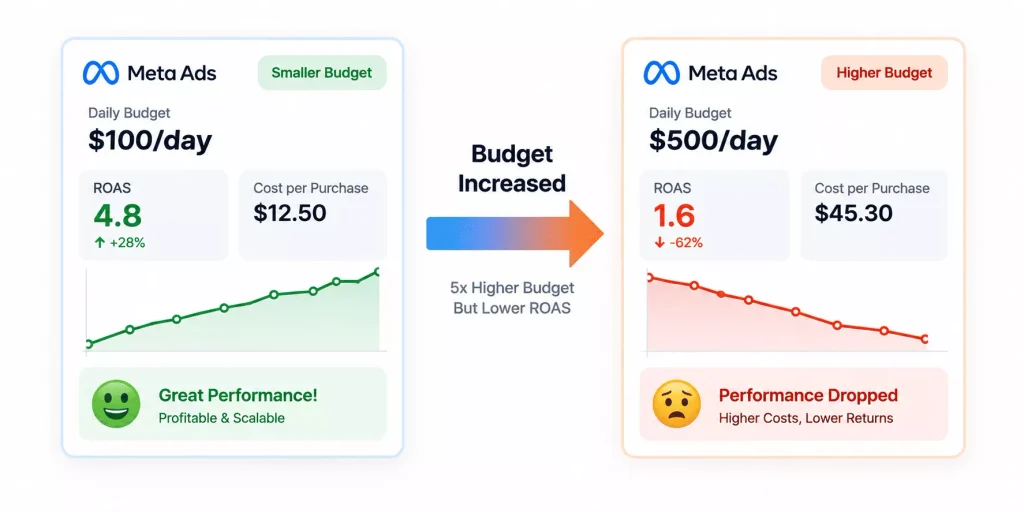
That’s the real reason a campaign that performed beautifully at $100/day can fall apart at $500/day. The underlying economics have changed, not the creative or the audience.
The 20% Budget Rule and Why It Works
The most reliable and widely used rule in Meta Ads scaling is this: never increase a campaign’s budget by more than 20% in a single change, and wait at least 3–5 days before increasing again.
It sounds conservative. And that’s precisely the point.
A 20% increase stays within a range the algorithm can adapt to without losing what it’s already learned. It adjusts gradually, maintains its ptimization data, and continues delivering without resetting. A jump from $500/day to $2,000/day in one move is essentially telling Meta to treat it as a brand new campaign which it does, complete with all the instability of the learning phase.
| Week | Daily Budget | Change |
| Week 1 | $500 / day | Starting point |
| Week 2 | $600 / day | +20% |
| Week 3 | $720 / day | +20% |
| Week 4 | $865 / day | +20% |
| Week 5 | $1,040 / day | +20% |
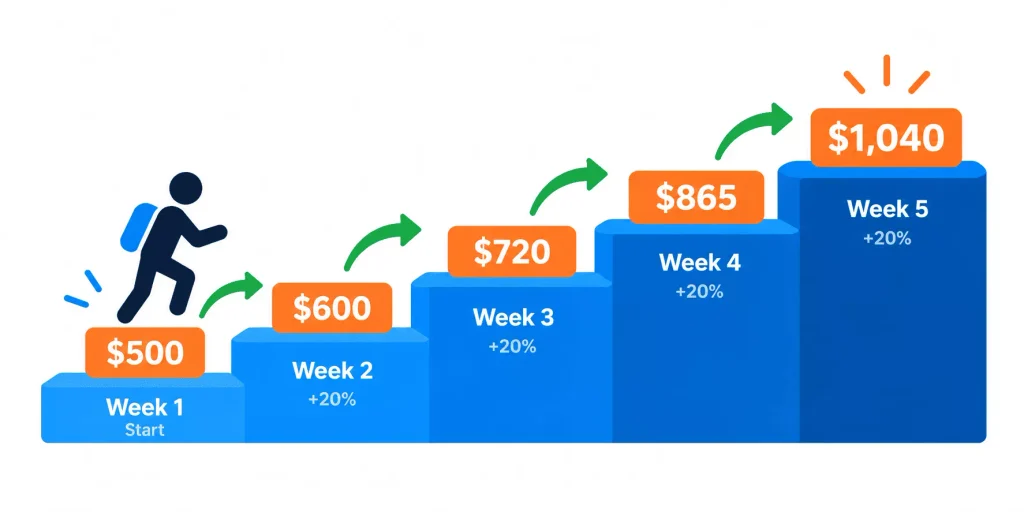
Five weeks. Budget more than doubled. And the algorithm barely noticed which is exactly the goal. Compare that to one big jump that resets everything overnight.
One thing worth knowing: this rule applies to edits on live campaigns. If you’d rather not risk touching what’s already working, duplicate the ad set at the higher budget and run both at the same time. The original holds its data; the duplicate gives you a clean read on the new spend level.
CBO vs. Ad Set Budgets: Which to Use at Scale
Budget control in Meta Ads comes down to two options: set it at the campaign level and let Meta distribute it (CBO, now called Advantage Campaign Budget), or lock a fixed amount to each ad set yourself (ABO).
When you’re still in testing mode and need every ad set to get a fair look, ABO makes sense. You control where the money goes, which matters when you’re comparing audiences or creatives and can’t afford one ad set starving another.
For scaling, CBO is almost always the stronger choice. Meta’s system can see, in real time, which ad set is converting best at any given moment and CBO lets it move budget dynamically toward that ad set rather than spending a fixed amount on each regardless of performance.
| CBO (Advantage Campaign Budget) | ABO (Ad Set Budget) | |
| Best for | Scaling proven campaigns | Testing new audiences / creatives |
| Budget control | Campaign-level (Meta allocates) | Ad set-level (you control) |
| Flexibility | High Meta shifts spend in real time | Low fixed per ad set |
| Min. budget | $300–$500/day recommended | Any budget |
| Use when | 3–5 proven ad sets ready to scale | Comparing ad sets fairly |
For the full breakdown of how Meta’s system distributes budget automatically, Meta’s Advantage+ Campaign Budget documentation explains the logic behind how spend gets allocated in real time.
A practical way to use both: run ABO while you’re testing to find what works, then move your winners into a CBO campaign and let Meta take it from there.
How to Structure Campaigns for Scaling
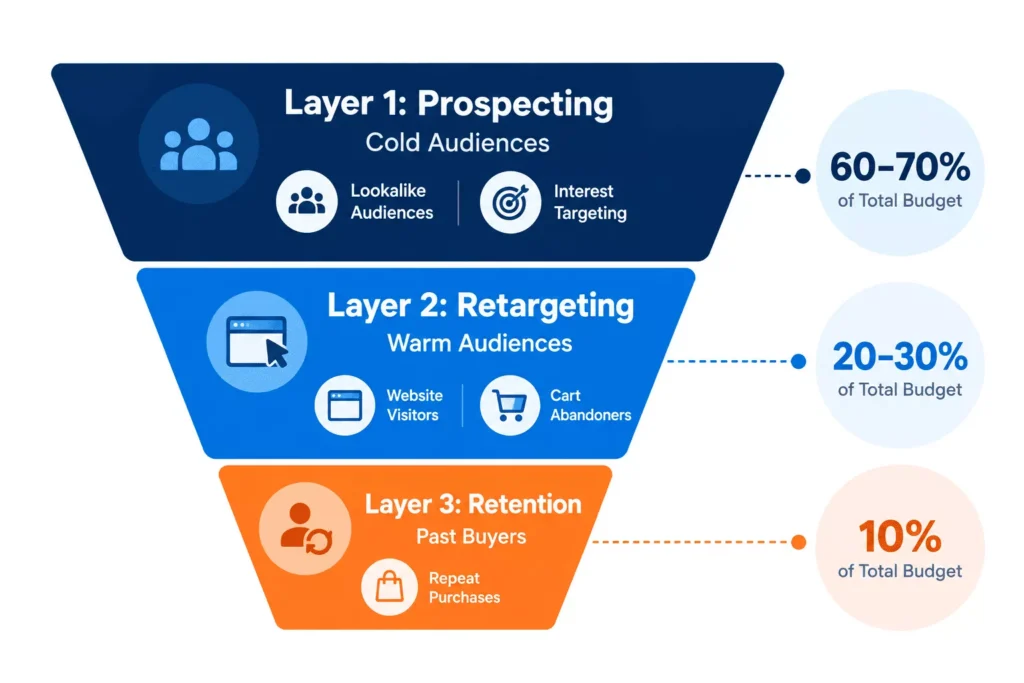
Trying to scale a single campaign that contains both cold and warm audiences is one of the most reliable ways to cap your own growth. The algorithm ends up splitting its attention between two completely different buying stages and it rarely handles both well.
Separating them into three distinct layers gives you far more control and room to push each one without it affecting the others:
Layer 1: Prospecting (Cold Audiences)
- Goal: Bring in new buyers who’ve never heard of you
- Audiences: Lookalike audiences, broad interest targeting, Advantage+ Audiences
- Budget allocation: 60–70% of total spend
- Optimisation: Purchase or Add to Cart
Layer 2: Retargeting (Warm Audiences)
- Goal: Close the people who already showed interest
- Audiences: Website visitors (30–60 days), video viewers (50%+), engagers, add-to-cart abandoners
- Budget allocation: 20–30% of total spend
- Optimisation: Purchase
Layer 3: Retention (Past Buyers)
- Goal: Get previous customers to come back and buy again
- Audiences: Past purchasers (90–180 days)
- Budget allocation: 10% of total spend
- Optimisation: Purchase or specific product page views
When you want to scale, push prospecting spend first. Retargeting and retention will naturally benefit from more top-of-funnel volume. If you scale retargeting and retention without feeding the top of the funnel, you’ll burn through your warm audience quickly and hit a wall there’s simply no one left to convert.
Audience Strategy: Expanding Without Exhausting
The second most common cause of ROAS decline at scale after moving too fast on budgets is audience exhaustion. You can tell an audience is burning out when:
- Frequency climbs above 3–4 within a 7-day window for cold audiences
- CTR drops week-over-week without a corresponding CPM change
- CPA rises despite consistent spend and no creative changes
When these signals appear, the answer isn’t always more budget it’s a larger or fresher audience pool.
Lookalike Audiences
Lookalikes are built from a source audience (your customer list, website visitors, video viewers) and find people on Meta who share similar characteristics. They remain one of the most effective prospecting tools available.
How to scale with lookalikes:
- Start with a 1% Lookalike based on purchasers tightest match, highest quality
- Once 1% shows saturation signals, add 2–3% in a separate ad set
- As spend grows, layer in 3–5% lookalikes
- Source matters a purchaser-based lookalike almost always outperforms one built from page followers or general website visitors
Advantage+ Audiences
Meta’s Advantage+ Audiences removes manual audience selection and lets the algorithm find buyers across the entire platform. It sounds counterintuitive, but at meaningful budget levels it often outperforms tightly defined audiences because Meta has more freedom to find conversions wherever they exist.
Test it alongside lookalikes rather than as a replacement especially if your pixel has strong purchase data.
According to Meta’s own engineering documentation on Andromeda, advertisers who activated Advantage+ audience features saw an average 22% increase in ROAS – making it worth testing alongside your existing lookalike strategy.
Meta’s delivery system has shifted significantly in how it uses audience signals, if you want to understand exactly what changed, our breakdown of how Meta’s Andromeda AI chan ged audience targeting covers it in depth.
Geographic Expansion
If you’ve pushed as far as you can within one market, opening up a neighbouring country or region can add meaningful volume without disrupting what’s already running. Keep each geography in its own campaign stacking countries into existing campaigns muddies the data and makes it hard to tell what’s actually working where.
Creative: The Most Overlooked Scaling Lever
Of all the reasons Meta Ads performance falls apart at scale, stale creative is the one most advertisers don’t see coming and the one they’re slowest to fix.
When you scale spend, frequency rises. The same people see your ads more often. At some point and it happens faster than most people expect they stop engaging. CTR falls, costs rise, and the campaign looks like it’s broken. In many cases, it just needs new creative.
How Much Creative Do You Actually Need?
| Monthly Spend | Recommended Active Creatives |
| Under $10K | 5 – 8 variants |
| $10K – $30K | 10 – 20 variants |
| $30K – $100K | 20 – 40 variants |
| $100K+ | 40 – 80+ variants |
For creative inspiration, the Meta Ad Library is free and shows you every active ad any competitor is currently running including how long each version has been live, which tells you what’s likely still working for them.
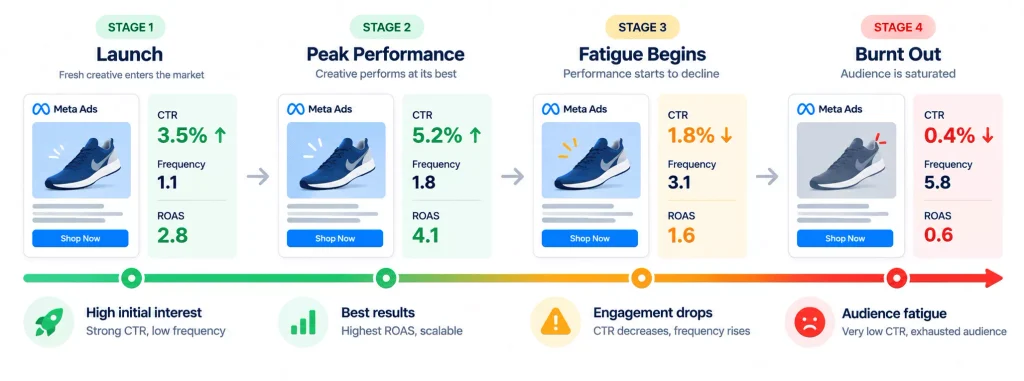
Signals That Creative Is Fatiguing
- Hook rate below 25% (3-second video views ÷ impressions) people aren’t stopping to watch
- CTR declining week-over-week without a CPM change the ad is being seen but ignored
- Frequency above 3 on a cold audience within a 7-day window
When you see these, the move isn’t to increase the budget. It’s to introduce new creative variants and let Meta redistribute spend toward the fresher ads.
What Creative Works at Scale
Formats that tend to hold up well at higher spend:
- UGC-style video feels native to the feed, doesn’t look like an ad
- Testimonial or review-based ads trust signals that work especially well on warm audiences
- Product demo videos shows rather than tells, drives strong CTR on cold audiences
- Static product images underrated; fast to produce and often more durable than video
- Carousel ads lets users explore multiple products or angles in one unit
Rotate formats regularly. Even a strong-performing video will eventually fatigue, and having a static or carousel ready to replace it prevents a performance cliff.
How to Spot and Fix Performance Drops Early
Not every performance dip after a budget increase means something is broken. The learning phase causes temporary instability that can last 5–10 days after any significant change. The key is knowing the difference between a learning-phase wobble and a genuine problem.
Signs It’s Just the Learning Phase
- Performance dipped immediately after a budget change
- The campaign has fewer than 50 conversion events that week
- Metrics are volatile (swinging up and down) rather than consistently declining
- It’s been less than 7 days since the change
What to do: Don’t touch it. Making further changes resets the learning phase again and compounds the problem. Give it at least 7 days before drawing conclusions.
Signs Something Is Actually Wrong
- Frequency is high (3+ for cold, 5+ for warm) and rising
- CTR has declined for 2+ consecutive weeks
- CPA has risen 30%+ from your baseline with stable spend
- CPM has spiked without an obvious seasonal or competitive explanation
What to do:
- Check creative performance pause the bottom 20% by CTR and rotate in fresh variants
- Check audience overlap overlapping ad sets compete against each other in auction
- Check frequency if it’s high, expand the audience or add exclusions
- If CPM spiked, check Auction Insights for new competitors entering your space
Common Meta Ads Scaling Mistakes
Making multiple changes at once. Changing the budget, audience, creative, and bid strategy simultaneously makes it impossible to know what helped or what caused the next crash. One change at a time, always.
Scaling before the data is stable. A campaign that’s been live for five days and showing good ROAS is not a proven winner it’s showing you a small, potentially skewed sample. Wait for at least 2–3 weeks and 50+ conversion events per week before pushing budget.
Pausing winning creatives. When an ad is performing well, don’t pause it to redirect spend toward testing. Let it run. Add new creative alongside it and let Meta decide where to spend.
Relying on Meta’s reported conversions alone. iOS privacy changes have made Meta’s attribution less reliable. Use Meta’s reported data alongside your actual order data from Shopify, your CRM, or Google Analytics to get an accurate picture. If Meta shows 50 purchases and your backend shows 30, the backend number is closer to reality.
Neglecting the retargeting pool. As prospecting spend scales, more people enter your warm audience every day. If retargeting spend doesn’t grow at all, you’re leaving the easiest conversions on the table.
Scaling Readiness Checklist
Before touching your Meta Ads budget, confirm every item below:
- Campaign has been live for at least 14 days
- Ad set has exited the learning phase (50+ optimisation events per week)
- ROAS has been stable for at least 7 consecutive days
- Cold audience frequency is below 2.5 (7-day window)
- You have at least 3 fresh creative variants ready to rotate in
- Pixel is firing correctly purchase events with revenue values are being recorded
- Prospecting and retargeting are in separate campaigns
- Audience overlap between ad sets has been checked and minimised
- Contribution margin supports the target ROAS at higher volume
- Attribution is being cross-referenced with backend order data
Any box that isn’t ticked is worth addressing before you touch the budget. More spend won’t fix a structural problem it just makes it more expensive.
Not sure where your account stands? A professional Meta Ads account audit is the fastest way to identify what’s holding your performance back before you scale.
Wrapping Up
Scaling Meta Ads well has nothing to do with timing a big push. It’s about having the right foundations in place so that when spend goes up, performance doesn’t fall apart a campaign structure that separates intent levels, creative that gets refreshed before it wears out, and audiences that grow ahead of saturation rather than after.
The 20% rule keeps the algorithm stable. CBO allocates budget where it’s working. Clean campaign layers prevent cold and warm audiences from cannibalising each other. Fresh creative keeps fatigue from killing performance before you even notice it’s happening.
The accounts that grow without breaking are rarely the ones moving fastest they’re the ones paying attention. Run through the checklist. If it clears, take your strongest prospecting campaign up by 20%. Wait five days. Then assess.
FAQ
No more than 20% at a time, with 3–5 days between increases. Larger jumps trigger a learning phase reset, causing temporary performance instability that can last 7–10 days.
Calculate your breakeven ROAS first: divide 1 by your gross margin percentage. If your margin is 50%, your breakeven ROAS is 2.0x. Aim to stay above that. At scale, expect 10–25% ROAS compression compared to smaller budgets.
CBO (Advantage Campaign Budget) generally outperforms ABO above $300–$500/day because Meta can shift spend dynamically to the best-performing ad set in real time. Use ABO for testing phases where you need equal budget distribution across ad sets.
High frequency usually means your audience is too small relative to your budget, or you’ve been running the same creatives for too long. Fix it by expanding into lookalikes, testing Advantage+ Audiences, or introducing fresh creative.
Learning-phase instability is volatile and short-lived performance swings up and down in the first 5–7 days after a change. A real problem shows up as a consistent, directional decline: CTR dropping week after week, CPA rising without changes, or frequency climbing steadily.
Lookalike audiences are built from a specific source (customer list, website visitors) and target people with similar profiles. Advantage+ Audiences give Meta complete freedom to find buyers anywhere on the platform. Both are worth testing the winner depends on your pixel data quality and account history.
At minimum, introduce new creative variants every 2–3 weeks. At higher budgets ($30K+/month), weekly testing cycles are more appropriate. Build a pipeline that always has new variants ready replace ads proactively rather than reactively.
Not sustainably. Creative fatigue is one of the most common causes of performance decline at scale. Before scaling spend significantly, make sure you have a consistent creative production process even simple UGC-style videos or strong static images rotate well and can be produced cost-effectively.
Use up and down arrow keys to resize the meta box pane.
Keyur Valand

Hey, I’m Keyur - a Performance Marketer passionate about helping brands grow through data-driven digital marketing strategies. I specialize in Google Ads, Meta Ads, and eCommerce performance campaigns, with a strong focus on scaling revenue, improving ROAS, and generating high-quality leads through smart and result-oriented marketing.
Contact Form Popup
Boost Your Business Now
This will close in 0 seconds
apply now popup
Apply Now
This will close in 0 seconds
Get free audit popup
Get Free Google Ads Account Audit Worth $999
This will close in 0 seconds
Contact page Form Popup
Contact Us
This will close in 0 seconds