

Getting a product approved in Google Merchant Center can feel like the hard part is done. But approval is only the starting point. It simply means Google can consider showing the product. It doesn’t mean the product will appear for the right searches, win enough Shopping auctions, or get the click when it appears next to other products
That gap between “approved” and “actually winning” is what feed health is about. And the stakes on that gap just got higher. Shopping surfaces are shifting toward AI-assisted and conversational search and shopping agents are starting to discover products and even complete checkout on a person’s behalf, Google’s own push here is the open-source Universal Commerce Protocol (UCP), announced in January 2026. None of this is fully mainstream yet, but it is moving fast enough that the merchants treating their feed as a one-time setup task are already losing visibility to the ones treating it as an ongoing discipline.
This guide breaks down what feed health actually means, which attributes move the needle and what’s changing in Google Shopping this year that makes ignoring your feed a more expensive mistake than it used to be.
Why Feed Health Actually Moves the Needle in 2026
This isn’t a theoretical exercise, either. Google has actually put numbers on this, and they’re worth acting on.
Per Google’s own Merchant Center guidance, merchants who adopt core feed best practices tend to see:
- About a 5% lift in conversions the following month
- Roughly 4.5% more conversion value
- A 6% jump in clicks for merchants using high-quality (1500x1500px) images
These aren’t numbers pulled from some third-party study. They’re from Google’s own internal analysis of Merchant Center accounts, which is exactly why they’re worth anchoring to if you’ve only got so much time to spend fixing things.
Search is changing too. People are using longer and more conversational searches, including searches made through AI Mode instead of the usual Shopping tab. But the basic requirement is still the same: Google needs useful product information from your feed. If the feed is incomplete or missing important details, the product has less information to work with when matching it to what someone is looking for. What hasn’t changed is what Google’s actually matching against: your feed, still. A thin, half-filled-out product doesn’t just lose auctions in classic Shopping – it quietly disappears from conversational search too, for the exact same reason.
What Actually Decides Who Wins the Shopping Auction
Every Shopping ad that gets served is the output of three inputs working together: data quality and product relevance, predicted click-through rate and bid. Merchants often assume the fix for underperformance is a bigger bid. In practice, the more reliable lever is relevance.
A merchant with rich, accurate feed data – correct identifiers, detailed titles, high-quality images can drive traffic at a lower cost than a competitor who is bidding higher but feeding Google thin product data. Google’s own guidance is explicit about this: robust feed attributes let merchants compete on relevance rather than needing to outbid everyone else for the same placement.
That reframes the priority order for anyone managing a Shopping account: fix the feed first, then tune the bid – not the other way around.
The Four Pillars of a Healthy Feed
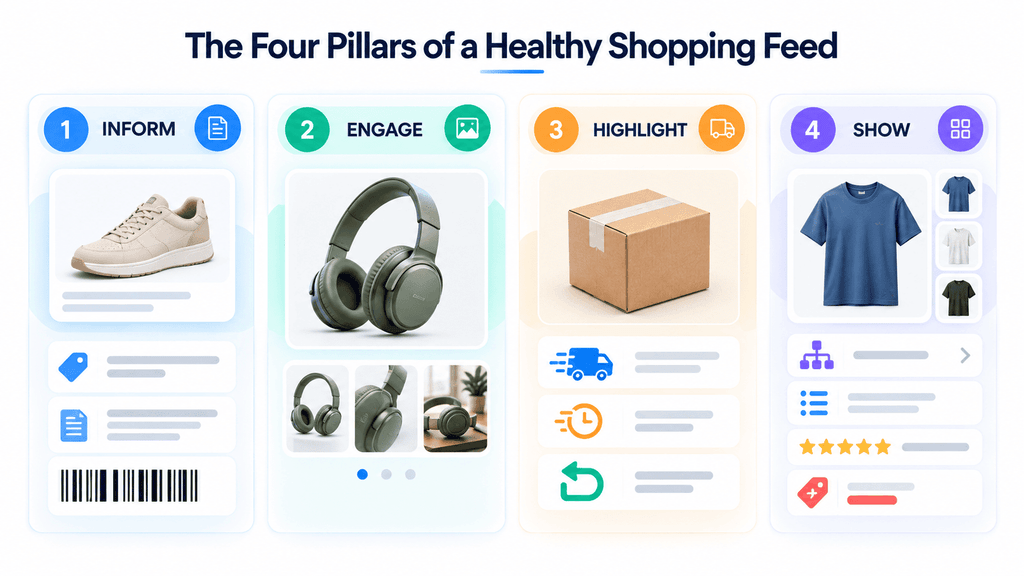
Google groups the attributes that matter most into four functional categories. Each one answers a different question a shopper (or Google’s matching system) is implicitly asking.
1. Inform: Get the Product Basics Right
This is the foundation everything else sits on – title, description and GTIN.
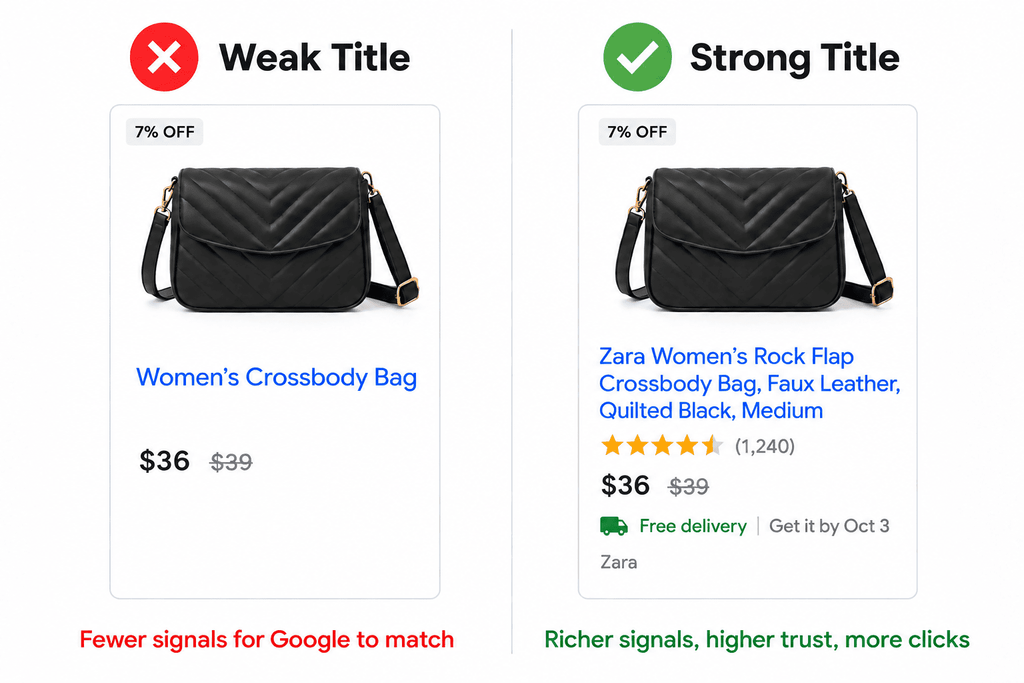
Titles
- Put the important details first – brand, product type, color and size. Don’t leave useful information until the end.
- Use the available 150 characters when you have relevant product details to add. A very short title often doesn’t give enough information to clearly describe the product or match it with specific searches.
- A generic title gives Google very little information about the product. A more specific title gives it much more to work with.
| Attribute group | Recommended structure | Example |
| Apparel | Brand + Product type + Attributes (Color, Material, Size) | Zara Women’s Rock Flap Crossbody Bag, Faux Leather, Quilted Black, Medium |
Descriptions
- Aim for more than 500 characters in your description, and get the most important details into the first 160–500; that’s the part most likely to actually get read or matched
- Write about the product that’s actually being sold rather than relying on the same template for every item. “Soft, breathable cotton, reinforced stitching, machine washable” tells a shopper something useful. “Great quality, great price” doesn’t really tell them anything about the product.
- Keep promotional wording such as “Free Shipping” or “On Sale” out of the description. Avoid ALL CAPS, external links and direct comparisons with competitors as well.
Bad: Great quality, great price, don’t miss out
Good: Soft, breathable cotton crew-neck T-shirt with reinforced stitching, machine washable, available in 5 colors.
GTIN
- A GTIN is a standard product identifier linked to a product’s barcode. It helps Google identify the product and match your listing with information it already has about that product.
- If the product doesn’t have a GTIN, leave the field blank. Don’t create or guess one just to fill the field. An incorrect GTIN can cause problems with the product listing.
- For custom, white-label, or handmade products: skip the GTIN entirely and assign a consistent brand name plus a unique MPN instead
Myth: A made-up GTIN is better than leaving the field blank.
Fact: An invalid GTIN is more likely to get a listing disapproved or suppressed than an empty one. Blank is always the safer call.
2. Engage: Make the Product Visually Convincing
Image quality is one of the most measurable levers in the entire feed.
- Google still recommends around 1500x1500px for best performance – that part hasn’t changed
- What’s actually changing is the enforced minimum. Google’s raising the floor from 100x100px (non-apparel) and 250x250px (apparel) to 500x500px across the board, with full enforcement kicking in January 31, 2027
- Beyond the primary shot, add at least three more images showing different angles or variants, plus one lifestyle image – the product on a model, staged in a room, or part of a set
Quick check: Take your 10 best-selling products and see how many still have images below 500×500px. Those products should be your starting point for an image cleanup.
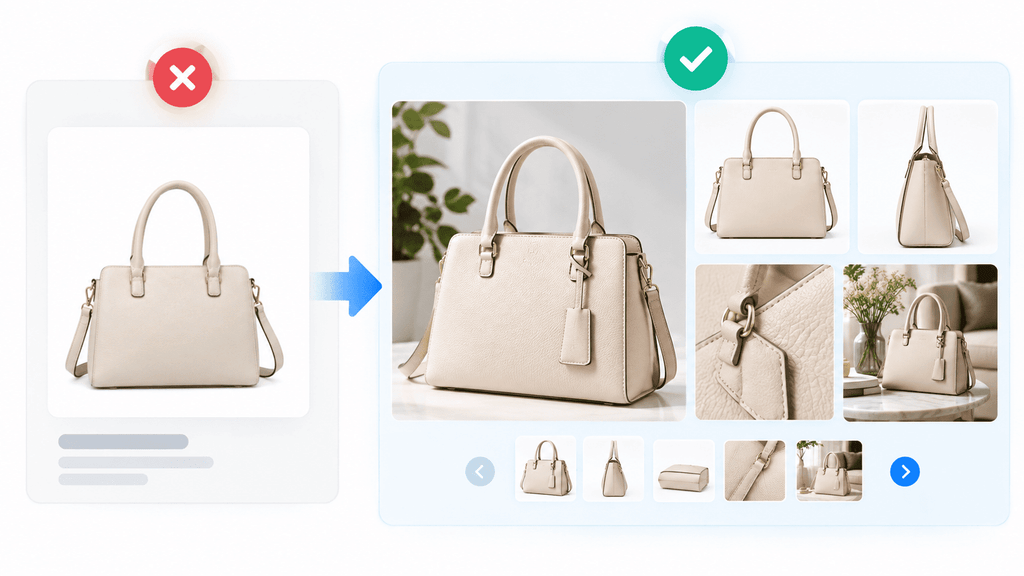
No photography budget or team? Google’s Product Studio, a free AI tool built into Merchant Center can generate new background scenes, upscale low-resolution photos, and strip cluttered backgrounds without a reshoot. It’s available in every country where Merchant Center operates, making it one of the lowest-effort ways to close an image gap at scale.
3. Highlight: Remove the Friction Around Buying
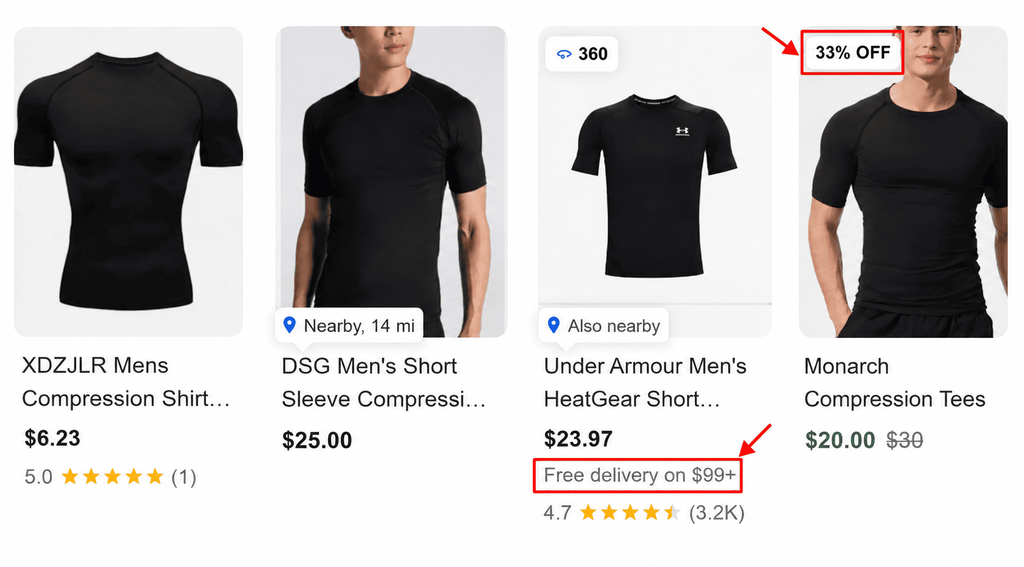
This category is about answering the practical questions a shopper has before checkout: what will this cost me beyond the sticker price and how long will I wait?
- Free shipping, submitted accurately when it applies at no extra cost to the customer
- Shipping speed, so a shopper can weigh delivery time against alternatives
- Return policy, including clear rules and timelines for returns
These attributes don’t change what the product is, but they remove the uncertainty that causes cart abandonment even after a click.
4. Show: Give Shoppers a Reason to Choose You Specifically
The final category is about differentiation – the details that separate your listing from a near-identical one sold by a competitor.
- Product type (product_type), your own internal category hierarchy, submitted as a full breadcrumb (e.g., “Books > Non-Fiction > Sports > Baseball” rather than just “Baseball”) to improve how well your taxonomy matches user search intent
- Product highlights (product_highlight), 2 to 100 short, scannable bullet points (4–6 is the sweet spot) describing features only – never pricing, promotions or shipping details, which belong in other attributes
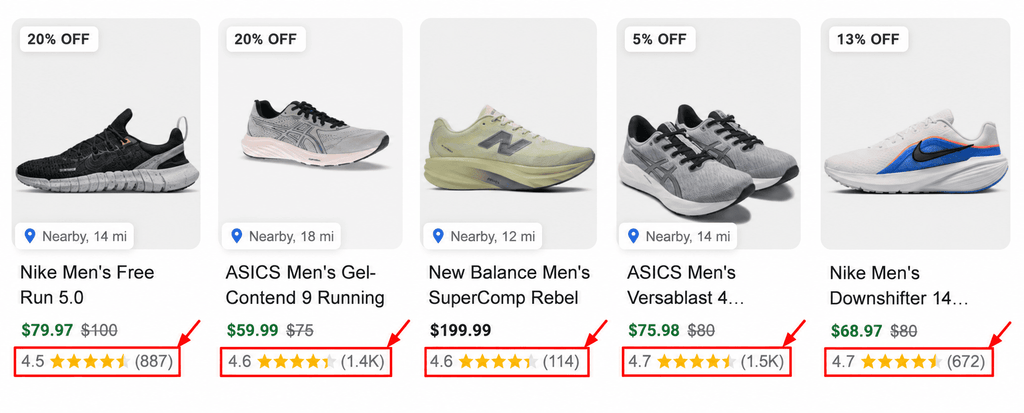
- Product ratings pull aggregated customer review stars straight into the ad, which is often the first thing a shopper’s eye goes to before the title
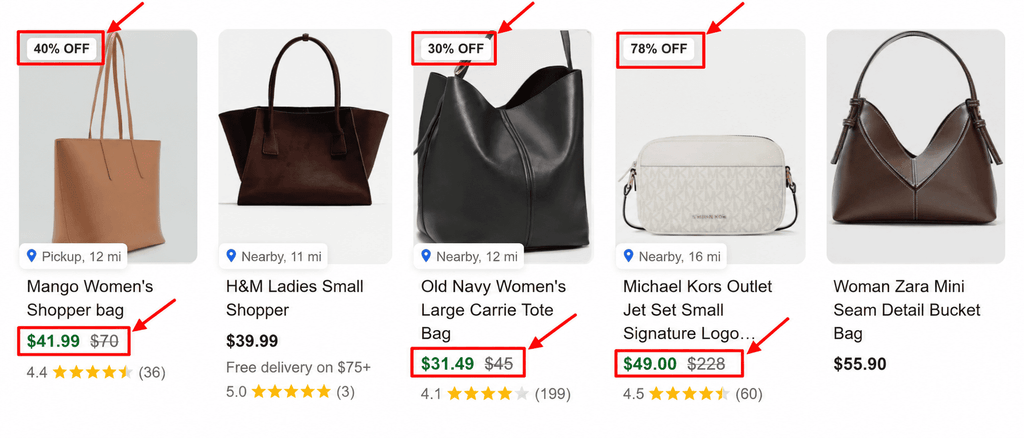
- Sale price, submitted alongside the original price in the price attribute so Google can automatically apply “Sale” badges and strikethrough pricing when eligibility criteria are met – generally a discount between 5% and 90%, with the original price having been charged for a minimum qualifying period beforehand (this varies slightly by country and ad type)
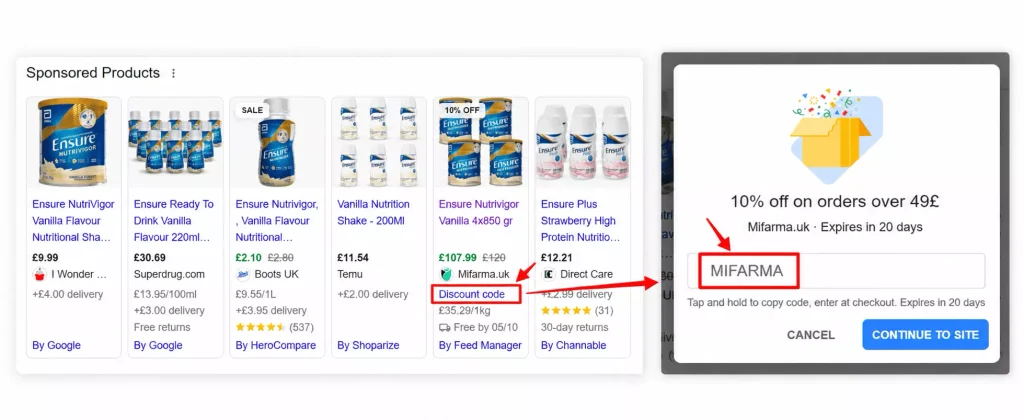
- Promotions, If you’re already running a promo code on your website, you can add that same code as a promotion in Merchant Center, and it shows up as a “special offer” link on the Shopping ad itself, which shoppers click to reveal the code
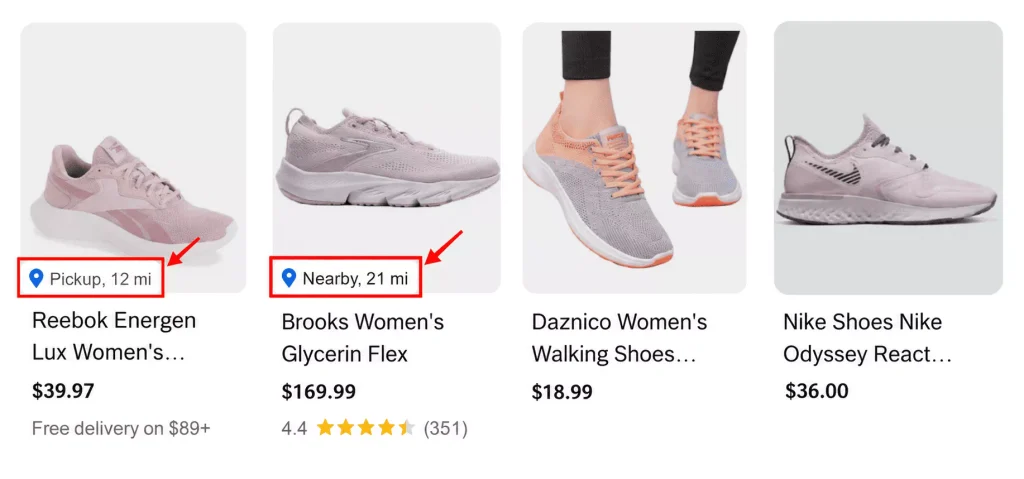
- Location shows when a product is available from a nearby local store and displays the distance (e.g., “Nearby, 8 km”) to help shoppers identify products available from retailers close to their location.
Which Attributes Are Worth Prioritizing First
Start with the attributes that are most important for understanding the product and helping shoppers evaluate it. Here’s a practical order to start with
| Attribute | Primary impact |
| Title | Highest impact on both matching (which searches you appear for) and click-through |
| GTIN | High impact on eligibility and accurate product matching |
| Images | High impact on click-through and conversion once served |
| Description | Moderate impact on matching depth and shopper confidence |
| Product type / highlights | Moderate impact on discovery and readability |
| Shipping, returns, ratings | Moderate impact on conversion, low impact on initial matching |
If you can only fix one thing this week, fix titles and images first – they influence both whether you’re shown at all and whether the click converts once you are.
What to Avoid
- Don’t guess or fabricate a GTIN when a product doesn’t have one – leave the field blank instead
- Keep promotional language, ALL CAPS and external links out of product descriptions.
- Skip direct competitor comparisons too – not in titles, not in descriptions, not in highlights.
- Don’t submit product highlights that duplicate pricing or shipping information already covered elsewhere
- Don’t treat feed optimization as a one-time launch task – stale images, outdated availability and unrefreshed descriptions degrade performance quietly over time
- Don’t wait until the week of a major sale to discover your GTINs, images or reviews are missing
Building a Practical Feed Health Routine
- Audit before you optimize. Before changing titles or images, first find out what is actually wrong. Check for missing GTINs, short or incomplete titles, thin descriptions and low-resolution images. These are some of the easiest issues to spot and give you a good starting point for the cleanup.
- Fix images and product data before high-traffic periods. Upload any available images from existing marketplace listings, apply feed rules to standardize titles and descriptions at scale and make sure sale badges are current before a sale goes live – not after.
- Close out GTINs and reviews with enough lead time. Manufacturer identifiers and aggregated review data both take time to reflect once submitted, so they shouldn’t be the last thing addressed before a peak sales period.
- Check Merchant Center diagnostics regularly. Review product disapprovals, warnings, missing attributes, price or availability mismatches and other feed issues. Fixing these problems regularly helps prevent eligible products from losing visibility because of outdated or incomplete product data.
- Re-run the audit quarterly. Feed health decays as catalogs grow and product data ages – treat it as a recurring maintenance item, not a launch checklist.
Conclusion
A healthy Google Shopping feed doesn’t just get your products approved. It helps determine how accurately they can match relevant searches and how effectively they can compete once they’re live. The merchants seeing real uplift usually aren’t the ones simply outbidding everyone – they’re the ones feeding Google better data: accurate titles, valid identifiers, strong images and useful product details.
Feed optimization isn’t a one-time setup task. Product catalogs change, prices and availability change, new products are added and old product data becomes outdated. Start with an honest look at where your feed stands against the checks in this guide, fix the highest-impact issues first and make feed health part of your regular Google Ads management routine.
Frequently Asked Questions
It’s the ongoing process of improving the product data submitted to Google Merchant Center – titles, descriptions, images, identifiers and differentiators – so products are more likely to match relevant searches, win Shopping Ads auctions and convert once clicked.
Review your feed and Merchant Center diagnostics regularly, especially after making changes to product prices, availability, product data or feed settings. A quarterly audit is a useful baseline, with extra checks before major promotions or busy sales periods.
Titles should run longer than 30 characters, use more of that 150-character limit if you’ve got relevant details to add. Descriptions should pass 500 characters and the details that matter most should show up early, somewhere in that first 160 to 500 characters, since that’s the part most likely to get read or matched against.
Only if the product has one from its manufacturer. If it doesn’t – such as a custom, white-label or handmade item – leave the GTIN field blank and instead submit a consistent brand name and a unique MPN, rather than guessing or fabricating a value.
Yes – arguably more than before. AI shopping experiences and standards like Google’s Universal Commerce Protocol still rely on the same underlying product data. A thin or outdated feed becomes invisible in conversational discovery the same way it loses auctions in classic Google Shopping.
Need Help With Your Google Shopping Feed?
A healthy feed can make a big difference to how your Shopping campaigns perform.
If you’re unsure where your feed is losing opportunities, get a Google Ads audit from our team. We’ll review your campaigns, product data, and potential areas of wasted spend.
Request Your Free Google Ads Audit
Anand Dalsaniya

Hi, I'm Anand Dalsaniya, a PPC Executive at OLBUZ. I specialize in creating and optimizing Google Ads, Microsoft Ads (Bing Ads), and Meta Ads campaigns for both eCommerce brands and lead generation businesses. From scaling online stores with data-driven strategies to generating high-quality leads through performance marketing, I focus on maximizing ROAS, reducing acquisition costs, and delivering measurable business growth. Through my blogs, I share practical insights, campaign strategies, and real-world lessons to help businesses and marketers achieve better results.
24 Sep 2026
How to Scale Ad Spend Without Killing Your ROAS
Contact Form Popup
Boost Your Business Now
This will close in 0 seconds
apply now popup
Apply Now
This will close in 0 seconds
Get free audit popup
Get Free Google Ads Account Audit Worth $999
This will close in 0 seconds
Contact page Form Popup
Contact Us
This will close in 0 seconds